Author: Eldergate · updated 5 November 2026 by Eldergate
A '''Retouching Tool''' in a player's backpack.
The Ethereal Mount Retouching Tool is a former Veteran reward that allows players to change Ethereal mount from transparent to normal.
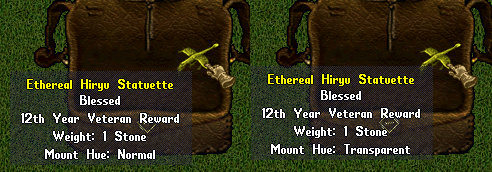
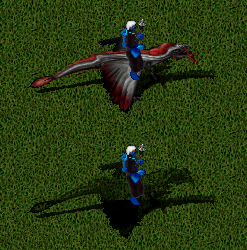
Example of changing an [[Ethereal Hiryu Statuette|Ethereal Hiryu]] from normal to transparent.Example of both versions of an [[Ethereal Hiryu Statuette|Ethereal Hiryu]].
Use
To use the Retouching Tool, place it and the Ethereal mount you wish to retouch in your Backpack. Double click the Retouching Tool and target the mount. The mount will display the retouch status in it's properties.
{"type":"doc","content":[{"type":"image","attrs":{"file":"Retouching-Tool.png","width":null,"align":"right","caption":"A '''Retouching Tool''' in a player's backpack."}},{"type":"paragraph","content":[{"type":"text","text":"The Ethereal Mount Retouching Tool is a former "},{"type":"reference","attrs":{"target_type":"article","target_id":1984,"label":null}},{"type":"text","text":" that allows players to change "},{"type":"reference","attrs":{"target_type":"article","target_id":626,"label":null}},{"type":"text","text":" from transparent to normal."}],"attrs":{"align":null}},{"type":"shardBlock","attrs":{"shard":"Eldergate","title":"Eldergate"},"content":[{"type":"paragraph","attrs":{"align":null},"content":[{"type":"text","text":"On Eldergate this is not a veteran reward: there is no account age requirement and anyone can use it. A tinker makes it from an ethereal dye concentrate, which an alchemist of Initiate rank makes first: see "},{"type":"reference","attrs":{"target_type":"article","target_id":2169,"label":null}},{"type":"text","text":"."}]}]},{"type":"image","attrs":{"file":"Ethy-Normal-Transparent.png","width":null,"align":"right","caption":"Example of changing an [[Ethereal Hiryu Statuette|Ethereal Hiryu]] from normal to transparent."}},{"type":"image","attrs":{"file":"Ethy-Ridden-Normal-Transparent.png","width":null,"align":"right","caption":"Example of both versions of an [[Ethereal Hiryu Statuette|Ethereal Hiryu]]."}},{"type":"heading","attrs":{"level":2},"content":[{"type":"text","text":"Use"}]},{"type":"paragraph","content":[{"type":"text","text":"To use the Retouching Tool, place it and the "},{"type":"reference","attrs":{"target_type":"article","target_id":626,"label":null}},{"type":"text","text":" you wish to retouch in your "},{"type":"reference","attrs":{"target_type":"article","target_id":169,"label":null}},{"type":"text","text":". Double click the Retouching Tool and target the mount. The mount will display the retouch status in it's properties."}],"attrs":{"align":null}},{"type":"paragraph","content":[{"type":"text","text":"Any Ethereal Mount can be retouched, including the "},{"type":"reference","attrs":{"target_type":"article","target_id":1495,"label":null}},{"type":"text","text":"."}],"attrs":{"align":null}}]}