Block tree (JSON)
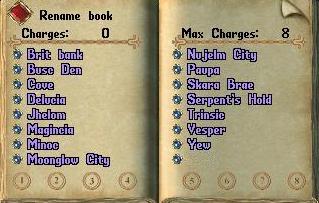
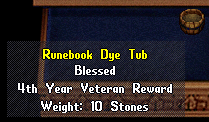
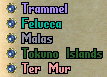
{"type":"doc","content":[{"type":"image","attrs":{"file":"Runebook_open_2d.jpg","width":null,"align":null,"caption":null}},{"type":"image","attrs":{"file":"RunebookPlain.png","width":null,"align":"left","caption":null}},{"type":"paragraph","content":[{"type":"text","text":"Runebooks can be used to "},{"type":"reference","attrs":{"target_type":"spell","target_id":56,"label":null}},{"type":"text","text":", "},{"type":"reference","attrs":{"target_type":"spell","target_id":107,"label":null}},{"type":"text","text":", or "},{"type":"reference","attrs":{"target_type":"spell","target_id":112,"label":null}},{"type":"text","text":" to any location contained within. They "},{"type":"reference","attrs":{"target_type":"article","target_id":2026,"label":"weigh"}},{"type":"text","text":" one "},{"type":"reference","attrs":{"target_type":"article","target_id":1721,"label":null}},{"type":"text","text":" and are always "},{"type":"reference","attrs":{"target_type":"article","target_id":231,"label":null}},{"type":"text","text":". You can add destinations to your runebook by dropping marked "},{"type":"reference","attrs":{"target_type":"resource","target_id":202,"label":null}},{"type":"text","text":"s onto it."}],"attrs":{"align":null}},{"type":"heading","attrs":{"level":2},"content":[{"type":"text","text":"Charges"}]},{"type":"paragraph","content":[{"type":"text","text":"A runebook can hold up to 16 charges. Grandmaster or better "},{"type":"reference","attrs":{"target_type":"skill","target_id":30,"label":"scribes"}},{"type":"text","text":" can "},{"type":"reference","attrs":{"target_type":"article","target_id":419,"label":"craft"}},{"type":"text","text":" runebooks with up to 20 charges. A runebook is \"charged\" by dropping Recall "},{"type":"reference","attrs":{"target_type":"resource","target_id":26,"label":"scrolls"}},{"type":"text","text":" onto it; Gate Travel scrolls will not work. The number of charges currently in your runebook is displayed on the top left page; the maximum charges is displayed on the top right page."}],"attrs":{"align":null}},{"type":"heading","attrs":{"level":2},"content":[{"type":"text","text":"Usage"}]},{"type":"heading","attrs":{"level":3},"content":[{"type":"text","text":"Travel with no Magery Skill"}]},{"type":"paragraph","content":[{"type":"text","text":"To travel with a runebook by consuming a charge, click the blue gem next to the location to which you wish to travel. You do not need a "},{"type":"reference","attrs":{"target_type":"article","target_id":1684,"label":null}},{"type":"text","text":" in your possession to use charges on your runebook. You will need the proper "},{"type":"reference","attrs":{"target_type":"article","target_id":1129,"label":null}},{"type":"text","text":", however this requirement is affected by "},{"type":"reference","attrs":{"target_type":"article","target_id":1095,"label":null}},{"type":"text","text":" items. Though no spellbook or "},{"type":"reference","attrs":{"target_type":"article","target_id":1459,"label":null}},{"type":"text","text":"s are needed to travel in this manner, the magery spell Recall is being effected, therefore all non-"},{"type":"reference","attrs":{"target_type":"article","target_id":1680,"label":null}},{"type":"text","text":" items in the "},{"type":"reference","attrs":{"target_type":"article","target_id":824,"label":null}},{"type":"text","text":" will drop to your "},{"type":"reference","attrs":{"target_type":"article","target_id":169,"label":null}},{"type":"text","text":"."}],"attrs":{"align":null}},{"type":"heading","attrs":{"level":3},"content":[{"type":"text","text":"Travel with Magery Skill"}]},{"type":"paragraph","content":[{"type":"text","text":"To Recall without consuming a runebook charge, but by using the "},{"type":"reference","attrs":{"target_type":"skill","target_id":35,"label":null}},{"type":"text","text":" "},{"type":"reference","attrs":{"target_type":"article","target_id":1631,"label":null}},{"type":"text","text":" and"},{"type":"reference","attrs":{"target_type":"article","target_id":1459,"label":null}},{"type":"reference","attrs":{"target_type":"article","target_id":119,"label":"an arcane charge"}},{"type":"text","text":" or "},{"type":"reference","attrs":{"target_type":"article","target_id":1459,"label":null}},{"type":"text","text":"s, go to the page containing the desired destination (you may click on the destination title to do this), and click the blue gem next to the word Recall. You must have a spellbook in your possession to do this. To create a "},{"type":"reference","attrs":{"target_type":"article","target_id":1190,"label":null}},{"type":"text","text":" using magery and an arcane charge or reagents, go to the page containing the desired destination, and click the Gate Travel gem. You must have at least a skill of 67 in Magery and a spellbook in your possession to do this."}],"attrs":{"align":null}},{"type":"heading","attrs":{"level":3},"content":[{"type":"text","text":"Travel with Chivalry Skill"}]},{"type":"paragraph","content":[{"type":"text","text":"To use Sacred Journey on a runebook using "},{"type":"reference","attrs":{"target_type":"skill","target_id":15,"label":"tithe"}},{"type":"text","text":" points rather than runebook charges, go to the page containing the desired destination, and click the blue gem next to Sacred Journey. You must have the appropriate skill and a "},{"type":"reference","attrs":{"target_type":"article","target_id":257,"label":null}},{"type":"text","text":" in your possession to do this."}],"attrs":{"align":null}},{"type":"heading","attrs":{"level":2},"content":[{"type":"text","text":"Default Locations"}]},{"type":"paragraph","content":[{"type":"text","text":"You can set a default location for your runebook. To do so, go to the page that displays the desired location, and click the \"Set Default\" button at the top of that page. The button will turn red to indicate that the selected location is the default location."}],"attrs":{"align":null}},{"type":"paragraph","content":[{"type":"text","text":"To Gate Travel, Recall, or Sacred Journey to the default location, you can simply cast the appropriate spell and target the cover of the runebook, just as you would target a rune. Voila!"}],"attrs":{"align":null}},{"type":"shardBlock","attrs":{"shard":"Eldergate","title":"Eldergate"},"content":[{"type":"paragraph","attrs":{"align":null},"content":[{"type":"text","text":"Putting the runes in order. ","marks":[{"type":"bold"}]},{"type":"text","text":"On the first page, each rune has two small arrows to its right: one moves the rune a place toward the top, the other a place toward the bottom. The first rune has no up arrow and the last has no down arrow. The book reopens on the first page after each move, so you can keep going."}]},{"type":"paragraph","attrs":{"align":null},"content":[{"type":"text","text":"The default location stays on the same rune wherever it moves. Like setting the default, moving a rune needs access to the book."}]}]},{"type":"heading","attrs":{"level":2},"content":[{"type":"text","text":"Naming"}]},{"type":"paragraph","content":[{"type":"text","text":"A runebook can also be named to distinguish it from other runebooks in your collection. To name a runebook, open it and click the Rename Book button on the top left page. Type in the new name and press Enter on your keyboard. Runebook names may only contain letters and spaces; no punctuation or special characters are allowed."}],"attrs":{"align":null}},{"type":"image","attrs":{"file":"Runebook_dye_tub.png","width":null,"align":null,"caption":null}},{"type":"heading","attrs":{"level":2},"content":[{"type":"text","text":"Dyeing"}]},{"type":"paragraph","content":[{"type":"text","text":"Runebooks may further be personalised by dyeing them by using a "},{"type":"reference","attrs":{"target_type":"article","target_id":1524,"label":null}},{"type":"text","text":"."}],"attrs":{"align":null}},{"type":"heading","attrs":{"level":2},"content":[{"type":"text","text":"Notes"}]},{"type":"image","attrs":{"file":"Runebook_Facets.png","width":null,"align":null,"caption":null}},{"type":"bulletList","content":[{"type":"listItem","content":[{"type":"paragraph","content":[{"type":"text","text":"You must reset all default locations if you change "},{"type":"reference","attrs":{"target_type":"article","target_id":643,"label":null}},{"type":"text","text":"s."}],"attrs":{"align":null}}]},{"type":"listItem","content":[{"type":"paragraph","content":[{"type":"text","text":"Place names within the book will be colored according to the facet they lead to."}],"attrs":{"align":null}}]}]},{"type":"heading","attrs":{"level":2},"content":[{"type":"text","text":"Sources"}]},{"type":"bulletList","content":[{"type":"listItem","content":[{"type":"paragraph","content":[{"type":"text","text":"EA Knowledge Base"}],"attrs":{"align":null}}]},{"type":"listItem","content":[{"type":"paragraph","content":[{"type":"text","text":"Stratics Forum Post #7673974 - 03/20/08"}],"attrs":{"align":null}}]}]},{"type":"heading","attrs":{"level":2},"content":[{"type":"text","text":"See Also"}]},{"type":"bulletList","content":[{"type":"listItem","content":[{"type":"paragraph","content":[{"type":"reference","attrs":{"target_type":"skill","target_id":30,"label":null}}],"attrs":{"align":null}}]},{"type":"listItem","content":[{"type":"paragraph","content":[{"type":"reference","attrs":{"target_type":"item","target_id":1863,"label":null}}],"attrs":{"align":null}}]},{"type":"listItem","content":[{"type":"paragraph","content":[{"type":"reference","attrs":{"target_type":"article","target_id":1113,"label":null}}],"attrs":{"align":null}}]}]}]}