Block tree (JSON)
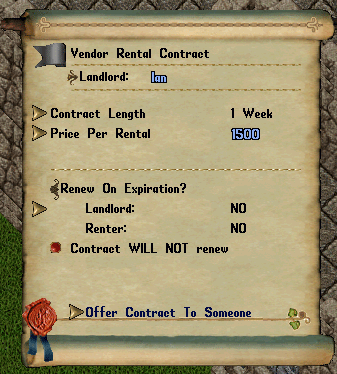
{"type":"doc","content":[{"type":"paragraph","attrs":{"align":null},"content":[{"type":"text","text":"Player vendors are hired by players and stand in their "},{"type":"reference","attrs":{"target_type":"article","target_id":922,"label":"houses"}},{"type":"text","text":", selling whatever their owner puts on them. For the shopkeepers in towns, see "},{"type":"reference","attrs":{"target_type":"article","target_id":2345,"label":"NPC Vendor"}},{"type":"text","text":"."}]},{"type":"image","attrs":{"file":"Contract.png","width":null,"align":null,"caption":null}},{"type":"image","attrs":{"file":"Terminate.png","width":null,"align":null,"caption":null}},{"type":"image","attrs":{"file":"Reclaim.png","width":null,"align":null,"caption":null}},{"type":"paragraph","attrs":{"align":null},"content":[{"type":"text","text":"Player-owned vendors are all unique and feature goods that their controlling player wishes to sell. Nearly anything that can be picked up or looted in the game can be sold on these vendors."}]},{"type":"paragraph","attrs":{"align":null},"content":[{"type":"text","text":"There are three types of vendors:"}]},{"type":"bulletList","content":[{"type":"listItem","content":[{"type":"paragraph","attrs":{"align":null},"content":[{"type":"text","text":"Regular vendor - Obtained through a Contract of Employment. Generates a vendor with a random race and gender. Charges a fixed daily fee and takes nothing from sales."}]}]},{"type":"listItem","content":[{"type":"paragraph","attrs":{"align":null},"content":[{"type":"text","text":"Rental vendor - Obtained through a Vendor Rental Contract. Allows owners to rent out vendor spaces at their house."}]}]},{"type":"listItem","content":[{"type":"paragraph","attrs":{"align":null},"content":[{"type":"text","text":"Commission vendor - Obtained through a Commission Contract of Employment. Generates a vendor of the same race as the owner. Available only to house owners. Charges only a fixed 5.25% commission fee on sold items."}]}]}]},{"type":"heading","attrs":{"level":2},"content":[{"type":"text","text":"Operation"}]},{"type":"paragraph","attrs":{"align":null},"content":[{"type":"text","text":"In order to place a vendor inside a house, first A Contract of Employment needs to be purchased from NPC bankers, minters, or inkeepers. The house that the vendor will be placed in should be set to public. Double-clicking on the contract will set the vendor in the same spot the character is standing. While the spot the vendor is standing cannot be changed through this menu, its name, gender, race, direction, and appearance can be customized by using the gump that appears by double-clicking on the vendor. The vendor's bag of goods can also be seen by selecting the 'See Goods' option on this gump."}]},{"type":"paragraph","attrs":{"align":null},"content":[{"type":"text","text":"Vendor Rental Contracts are available to rent a vendor spot inside a house to another player. The contract options display the contract length, the price per rental, and the names of the landlord and the renter. The option to renew the contract on expiration and, if so, the renewal price can also be set on the contract options. Note that customizable houses cannot be altered while the vendor of any other player is present in the house."}]},{"type":"paragraph","attrs":{"align":null},"content":[{"type":"text","text":"Each house can accommodate at least 10 vendors, also known as the vendor count. The size of the house can increase this number to a maximum of 42 vendors for customizable houses and 72 for castles."}]},{"type":"heading","attrs":{"level":2},"content":[{"type":"text","text":"Movement"}]},{"type":"paragraph","attrs":{"align":null},"content":[{"type":"text","text":"Moving player-owned vendors is only possible when the house contains only vendors owned by the house's owner. The owner places the house in "},{"type":"reference","attrs":{"target_type":"article","target_id":920,"label":"customization mode"}},{"type":"text","text":". Once a change to the structure is made, the vendors are placed in the moving crate. To remove a vendor from the crate, stand in the location the vendor is to be located and use the "},{"type":"reference","attrs":{"target_type":"article","target_id":398,"label":null}},{"type":"text","text":" on the character. A list of vendors will be presented."}]},{"type":"heading","attrs":{"level":2},"content":[{"type":"text","text":"Removal"}]},{"type":"paragraph","attrs":{"align":null},"content":[{"type":"text","text":"To remove a vendor, use the context menu on the vendor to be removed and choose 'Terminate'. The owner of the vendor must be online and nearby. To remove a vendor of a player that is not online, use the context menu and choose Contract Options. Set the Renew on Expiration to NO. The vendor will be removed after the current contract period has expired."}]},{"type":"paragraph","attrs":{"align":null},"content":[{"type":"text","text":"A vendor that has been removed from a house will have its goods transferred to the house sign for 7 days. To reclaim them, use the context menu on the house sign. After 7 days, the items will be transferred to the moving crate for the owner's safekeeping."}]},{"type":"heading","attrs":{"level":2},"content":[{"type":"text","text":"Vendor fees"}]},{"type":"paragraph","attrs":{"align":null},"content":[{"type":"text","text":"The vendor system charges its fees by real day, rather than an in-game day. A regular vendor takes the same fixed fee every day, whatever it has for sale, from the gold it holds, and nothing from its sales. Commission vendors, from a Commission Contract of Employment, charge no daily fee and take a share of every sale instead, recipes and bulk orders bought out of a book on the vendor included."}]},{"type":"shardBlock","attrs":{"shard":"Eldergate","title":"Eldergate"},"content":[{"type":"paragraph","attrs":{"align":null},"content":[{"type":"text","text":"Double-clicking your own vendor opens one menu with its pages down the left side: "},{"type":"text","marks":[{"type":"bold"}],"text":"Overview"},{"type":"text","text":", "},{"type":"text","marks":[{"type":"bold"}],"text":"Inventory"},{"type":"text","text":", "},{"type":"text","marks":[{"type":"bold"}],"text":"Sales"},{"type":"text","text":" and "},{"type":"text","marks":[{"type":"bold"}],"text":"Best sellers"},{"type":"text","text":", then "},{"type":"text","marks":[{"type":"bold"}],"text":"Add goods"},{"type":"text","text":" and "},{"type":"text","marks":[{"type":"bold"}],"text":"See goods"},{"type":"text","text":". Changing page or using a button keeps the menu open, so you never have to double-click the vendor again between two tasks."}]},{"type":"bulletList","content":[{"type":"listItem","content":[{"type":"paragraph","attrs":{"align":null},"content":[{"type":"text","marks":[{"type":"bold"}],"text":"Overview. "},{"type":"text","text":"A card per topic, each with its buttons beside it: wages (how many days are paid, the daily charge) or the commission, the gold held with Collect and Deposit, the shop and vendor names typed straight into the menu, the last week of sales, the vendor's appearance and paperdoll, whether it is listed in "},{"type":"reference","attrs":{"target_type":"article","target_id":2154,"label":null}},{"type":"text","text":", and Dismiss, which now asks first."}]}]},{"type":"listItem","content":[{"type":"paragraph","attrs":{"align":null},"content":[{"type":"text","marks":[{"type":"bold"}],"text":"Inventory. "},{"type":"text","text":"Every item on the vendor in one list, including what sits inside its containers, with a price and a description field on each row. Change as many as you like and press Apply changes; turning the page or sorting keeps what you typed. An empty price means not for sale. Sort by name, price or newest, or search."}]}]},{"type":"listItem","content":[{"type":"paragraph","attrs":{"align":null},"content":[{"type":"text","marks":[{"type":"bold"}],"text":"Adding goods. "},{"type":"text","text":"Add goods lets you click items in your own backpack one after another; each goes onto the vendor and shows at the top of the Inventory list, ready to price. You no longer need the vendor's backpack open. An item dropped on the vendor while the menu is open skips the price prompt the same way."}]}]},{"type":"listItem","content":[{"type":"paragraph","attrs":{"align":null},"content":[{"type":"text","marks":[{"type":"bold"}],"text":"Not for sale until priced. "},{"type":"text","text":"New goods arrive not for sale, so nothing can be bought at a default price while you fill the list in. A container that already holds items still asks for its price as it is dropped, as before."}]}]},{"type":"listItem","content":[{"type":"paragraph","attrs":{"align":null},"content":[{"type":"text","marks":[{"type":"bold"}],"text":"Sales and Best sellers. "},{"type":"text","text":"The vendor keeps a ledger: what it sold, for how much (and the commission taken), to whom and when. Best sellers groups the sales by item, most gold first, with the number of sales, the units, the gold and the gold per unit. Both can be narrowed to the last day, week or month, and searched. Recipes and bulk orders bought out of a book on the vendor are recorded too. The oldest sales drop off after a while, and dismissing the vendor clears its ledger."}]}]}]},{"type":"paragraph","attrs":{"align":null},"content":[{"type":"text","marks":[{"type":"bold"}],"text":"Selling builds a name. "},{"type":"text","text":"Every sale from your vendor gains you a little fame, more when the buyer is famous, and leans your karma toward the buyer's side. Sales to your own account's characters count for nothing."}]},{"type":"paragraph","attrs":{"align":null},"content":[{"type":"text","marks":[{"type":"bold"}],"text":"Room for more. "},{"type":"text","text":"A vendor holds up to 500 items. In a house, its goods still count against the house's storage."}]},{"type":"image","attrs":{"file":"player-vendor.png","width":null,"align":null,"caption":null}}]},{"type":"heading","attrs":{"level":2},"content":[{"type":"text","text":"See also"}]},{"type":"bulletList","content":[{"type":"listItem","content":[{"type":"paragraph","attrs":{"align":null},"content":[{"type":"reference","attrs":{"target_type":"article","target_id":2154,"label":null}}]}]},{"type":"listItem","content":[{"type":"paragraph","attrs":{"align":null},"content":[{"type":"reference","attrs":{"target_type":"article","target_id":71,"label":null}}]}]}]},{"type":"bulletList","content":[{"type":"listItem","content":[{"type":"paragraph","attrs":{"align":null},"content":[{"type":"text","text":"Publish 20 - Vendor Improvements"}]}]},{"type":"listItem","content":[{"type":"paragraph","attrs":{"align":null},"content":[{"type":"text","text":"New Magincia Bazaar"}]}]}]}]}