Block tree (JSON)
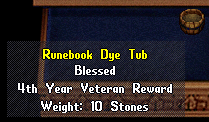
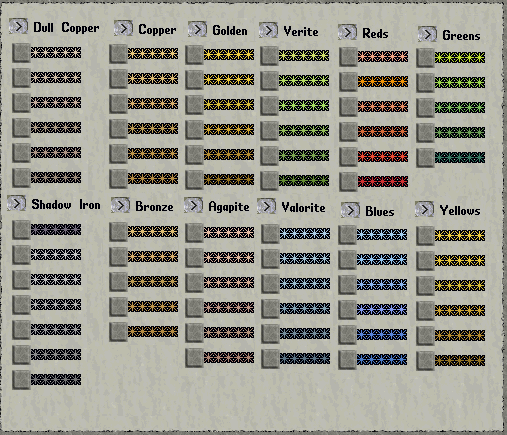
{"type":"doc","content":[{"type":"image","attrs":{"file":"Runebook_dye_tub.png","width":null,"align":null,"caption":null}},{"type":"paragraph","content":[{"type":"text","text":"A former "},{"type":"reference","attrs":{"target_type":"article","target_id":1984,"label":null}},{"type":"text","text":", the Runebook Dye Tub can dye "},{"type":"reference","attrs":{"target_type":"resource","target_id":202,"label":null}},{"type":"text","text":"s and "},{"type":"reference","attrs":{"target_type":"article","target_id":1523,"label":null}},{"type":"text","text":"s. If your account is not old enough, a system message will appear stating so along with the number of months until you can. "},{"type":"reference","attrs":{"target_type":"article","target_id":557,"label":null}},{"type":"text","text":" are used to change the color of the tub. Double-click the tub and target the runebook to make it the same color as the tub."}],"attrs":{"align":null}},{"type":"shardBlock","attrs":{"shard":"Eldergate","title":"Eldergate"},"content":[{"type":"paragraph","attrs":{"align":null},"content":[{"type":"text","text":"On Eldergate this is not a veteran reward: there is no account age requirement and anyone can use it. It is a reward for filling inscription "},{"type":"reference","attrs":{"target_type":"article","target_id":304,"label":"bulk orders"}},{"type":"text","text":", bought with bulk order points."}]}]},{"type":"heading","attrs":{"level":2},"content":[{"type":"text","text":"Notes"}]},{"type":"bulletList","content":[{"type":"listItem","content":[{"type":"paragraph","content":[{"type":"text","text":"The tub has "},{"type":"reference","attrs":{"target_type":"article","target_id":1567,"label":null}},{"type":"text","text":" when locked down"}],"attrs":{"align":null}}]},{"type":"listItem","content":[{"type":"paragraph","content":[{"type":"text","text":"To return a runebook to its original hue, press the \"Default\" button on the dye menu and dye the item with the tub"}],"attrs":{"align":null}}]}]},{"type":"heading","attrs":{"level":2},"content":[{"type":"text","text":"Colors"}]},{"type":"paragraph","content":[{"type":"text","text":"Here is an image showing all the available colors on the Runebook Dye Tub."}],"attrs":{"align":null}},{"type":"image","attrs":{"file":"Leather_dye_colors.png","width":null,"align":null,"caption":null}},{"type":"heading","attrs":{"level":2},"content":[{"type":"text","text":"See Also"}]},{"type":"bulletList","content":[{"type":"listItem","content":[{"type":"paragraph","content":[{"type":"reference","attrs":{"target_type":"article","target_id":557,"label":null}}],"attrs":{"align":null}}]},{"type":"listItem","content":[{"type":"paragraph","content":[{"type":"reference","attrs":{"target_type":"article","target_id":1984,"label":null}}],"attrs":{"align":null}}]}]}]}